手掌关键点检测
前言
手掌关键点指的是5个手指的关节位置,通过对关键点分析可以判断任意手势应用。
实验目的
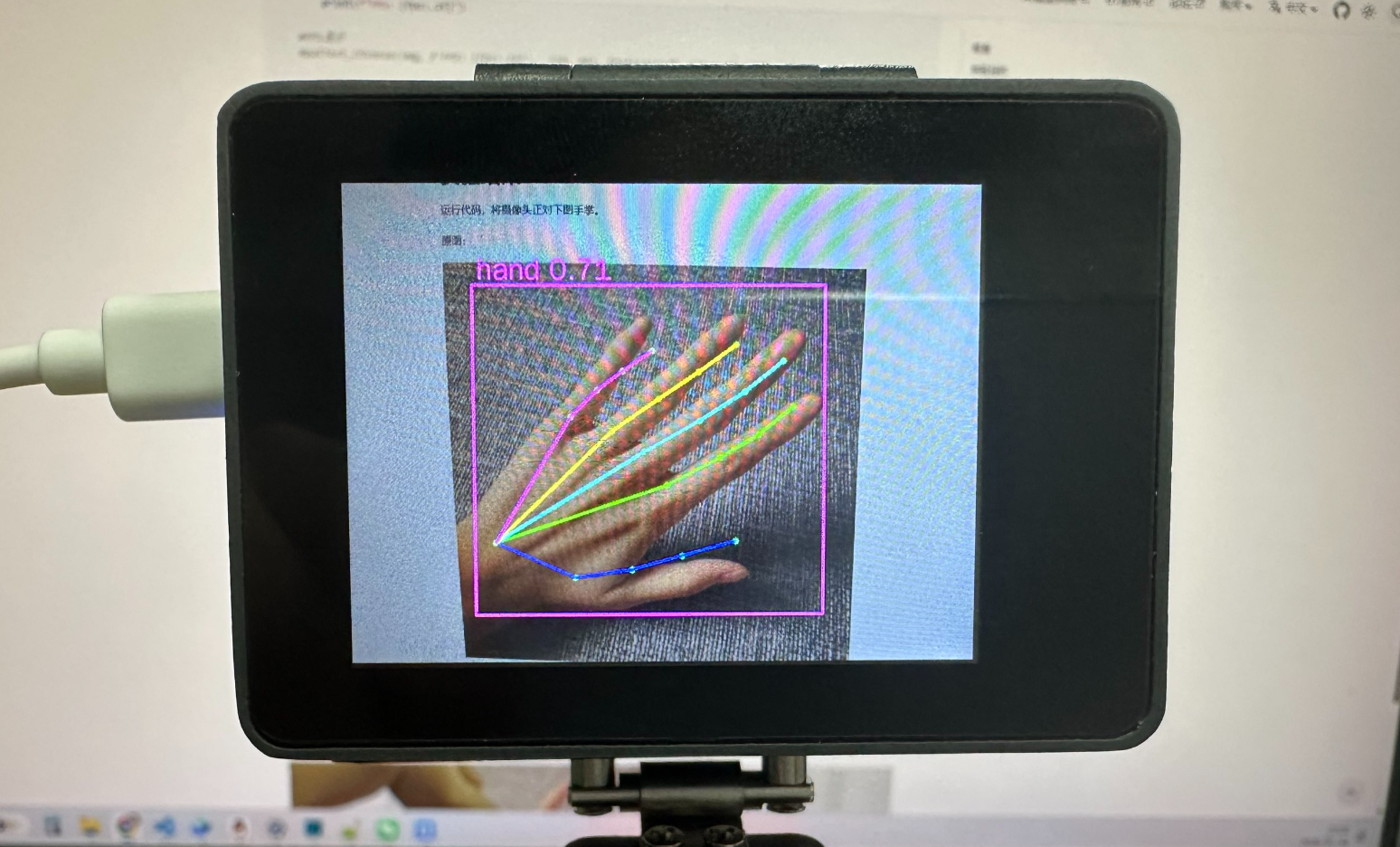
检测摄像头拍摄到的画面中的手掌关键点并画图指示。
实验讲解
手掌关键点检测模型已经预先训练好,存放在代码同一目录下,我们只需要加载模型文件,使用kpu库进行推理,并将返回的结果画图并显示即可。
具体编程思路如下:
参考代码
'''
实验名称:手掌关键点检测
实验平台:CyberCAM
'''

import cv2, time, os
from walnutpi import kpu, Display, Sensor, IDE, direction

# 优先当前文件夹下相对路径(app离线部署)
if os.path.exists("./hand_det.kmodel") and os.path.exists("./handkp_det.kmodel"):
    hand_det_path = "./hand_det.kmodel"
    hand_kp_path = "./handkp_det.kmodel"

# 使用系统绝对路径(IDE运行调试)
elif os.path.exists("/data/app/hand-keypoint/hand_det.kmodel") and \
     os.path.exists("/data/app/hand-keypoint/handkp_det.kmodel"):
    hand_det_path = "/data/app/hand-keypoint/hand_det.kmodel"
    hand_kp_path = "/data/app/hand-keypoint/handkp_det.kmodel"

else:
    raise FileNotFoundError("模型文件缺失,请检查当前路径与系统路径下的模型文件是否存在。")

detector = kpu.HAND_KEYPOINT(hand_det_kmodel=hand_det_path,
                          hand_kp_kmodel=hand_kp_path)

#字符显示改进,支持中英文显示
ft = cv2.freetype.createFreeType2()
ft.loadFontData("/usr/share/fonts/truetype/wqy/wqy-zenhei.ttc", 0)

def putText_Chinese(img, text, org, fontScale=30, color=(0, 255, 0)):
    global ft
    ft.putText(
        img=img,
        text=text,
        org=org,
        fontHeight=fontScale,
        color=color,
        thickness=-1,
        line_type=cv2.LINE_AA,
        bottomLeftOrigin=True
    )
    return img

# 初始化屏幕
Display.init()

# 初始化摄像头
cap = Sensor.Sensor(640, 480)
if not cap.isOpened():
    print("Cannot open camera")
    exit()

#获取当前显示屏方向,0表示默认,2表示180度翻转。
lcd_dir = direction.get_lcd()

# 判断显示屏是否翻转,如果翻转,则设置显示旋转180°,摄像头同时设置为前置模式(水平镜像)
if lcd_dir == 2:
    Display.set_rotation(2)
    cap.set_hmirror(1)

# ========== FPS计算 ==========
frame_count = 0
start_time = time.time()
fps = 0.0

# 手部骨架连接(5 根手指)
HAND_CONNECTIONS = [
    (0, 1), (1, 2), (2, 3), (3, 4),       # 拇指
    (0, 5), (5, 6), (6, 7), (7, 8),       # 食指
    (0, 9), (9, 10), (10, 11), (11, 12),  # 中指
    (0, 13), (13, 14), (14, 15), (15, 16),# 无名指
    (0, 17), (17, 18), (18, 19), (19, 20),# 小指
]

FINGER_COLORS = [
    (255, 0, 0),    # 拇指 - 蓝
    (0, 255, 0),    # 食指 - 绿
    (255, 255, 0),  # 中指 - 青
    (0, 255, 255),  # 无名指 - 黄
    (255, 0, 255),  # 小指 - 紫
]

while True:

    # 摄像头读取一帧
    ret, img = cap.read()

    # 手掌关键点检测
    results = detector.run(img, 0.2, 0.5)

    # 输出检测结果
    for result in results:
        print(f"HAND_KEYPOINT rel={result.reliability:.3f} "
              f"box=({result.x},{result.y},{result.w},{result.h}) "
              f"kps={len(result.keypoints)}")

    # 绘制结果
    for result in results:
        color = (255, 0, 255)
        label_text = f"hand {result.reliability:.2f}"

        left_x = int(result.x)
        left_y = int(result.y)
        right_x = int(result.x + result.w)
        right_y = int(result.y + result.h)

        # 获取文字尺寸
        (label_width, label_height), baseline = ft.getTextSize(label_text, 30, -1)

        # 防止标签超出图像顶部
        text_y = left_y - baseline  - 5
        bg_y1 = left_y - label_height - baseline
        if bg_y1 < 0:
            bg_y1 = 0
            text_y = label_height + 5

        # 画检测框
        cv2.rectangle(img, (left_x, left_y), (right_x, right_y), color, 2)
        putText_Chinese(img, label_text, (left_x + 5, text_y), fontScale=30, color=color)

        # 绘制关键点
        kps = result.keypoints
        for i, kp in enumerate(kps):
            cv2.circle(img, (kp.x, kp.y), 3, (0, 255, 0), -1)

        # 绘制手指连线
        if len(kps) >= 21:
            for idx, (start, end) in enumerate(HAND_CONNECTIONS):
                finger_idx = idx // 4
                color = FINGER_COLORS[finger_idx] if finger_idx < 5 else (128, 128, 128)
                cv2.line(img,
                         (kps[start].x, kps[start].y),
                         (kps[end].x, kps[end].y),
                         color, 2)

    # 每满1秒计算一次平均FPS
    frame_count += 1
    current_time = time.time()
    if current_time - start_time >= 1.0:
        fps = frame_count / (current_time - start_time)
        frame_count = 0
        start_time = current_time
        print(f"FPS: {fps:.1f}")

    #FPS显示
    #putText_Chinese(img, f'FPS: {fps:.1f}',  (500, 30), fontScale=30, color=(0, 255, 0))

    # 显示图像
    Display.show(img)
    IDE.show(img)
实验结果
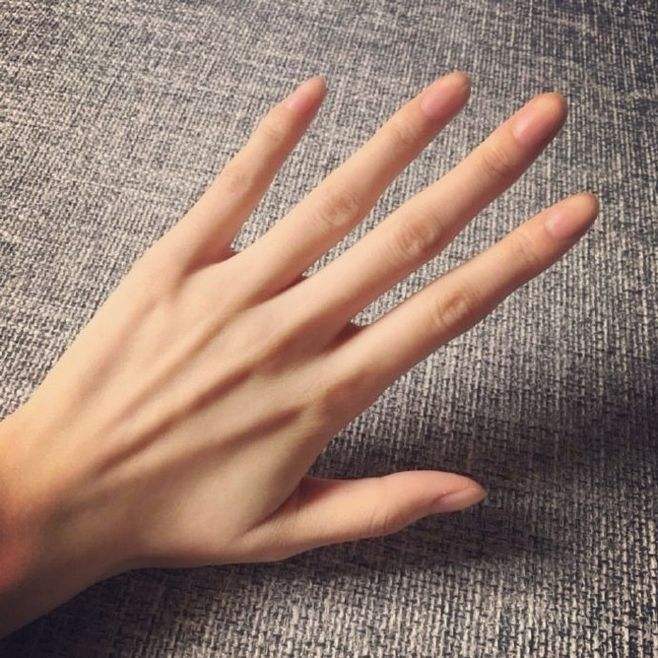
运行代码,将摄像头正对下图手掌。
原图:
识别结果: